
Updated October 23, 2026. PHP security guidance is changing quickly. This article distinguishes the October 21 PHP2Shell fixes from a separate October 23 advisory. Check the linked vendor notices again before making production changes.
A critical PHP vulnerability can affect a Canadian business even when its website looks normal, its WordPress dashboard is up to date and nobody has received a suspicious email. PHP runs behind many websites and business applications. A flaw in that underlying software can expose the application before a customer reaches the login screen.
In October 2026, emergency PHP security releases, Canadian government advisories and reports of exploitation attempts made this an immediate operational issue. The right response is to identify the software actually serving your website, apply the relevant fixes, assess a newly disclosed configuration-dependent issue and investigate signs of earlier compromise.
This guide explains what is known, which organizations have reported protective action, how Canadian businesses can respond and where managed IT support can help coordinate the work.

PHP vulnerability update: what Canadian businesses need to do now
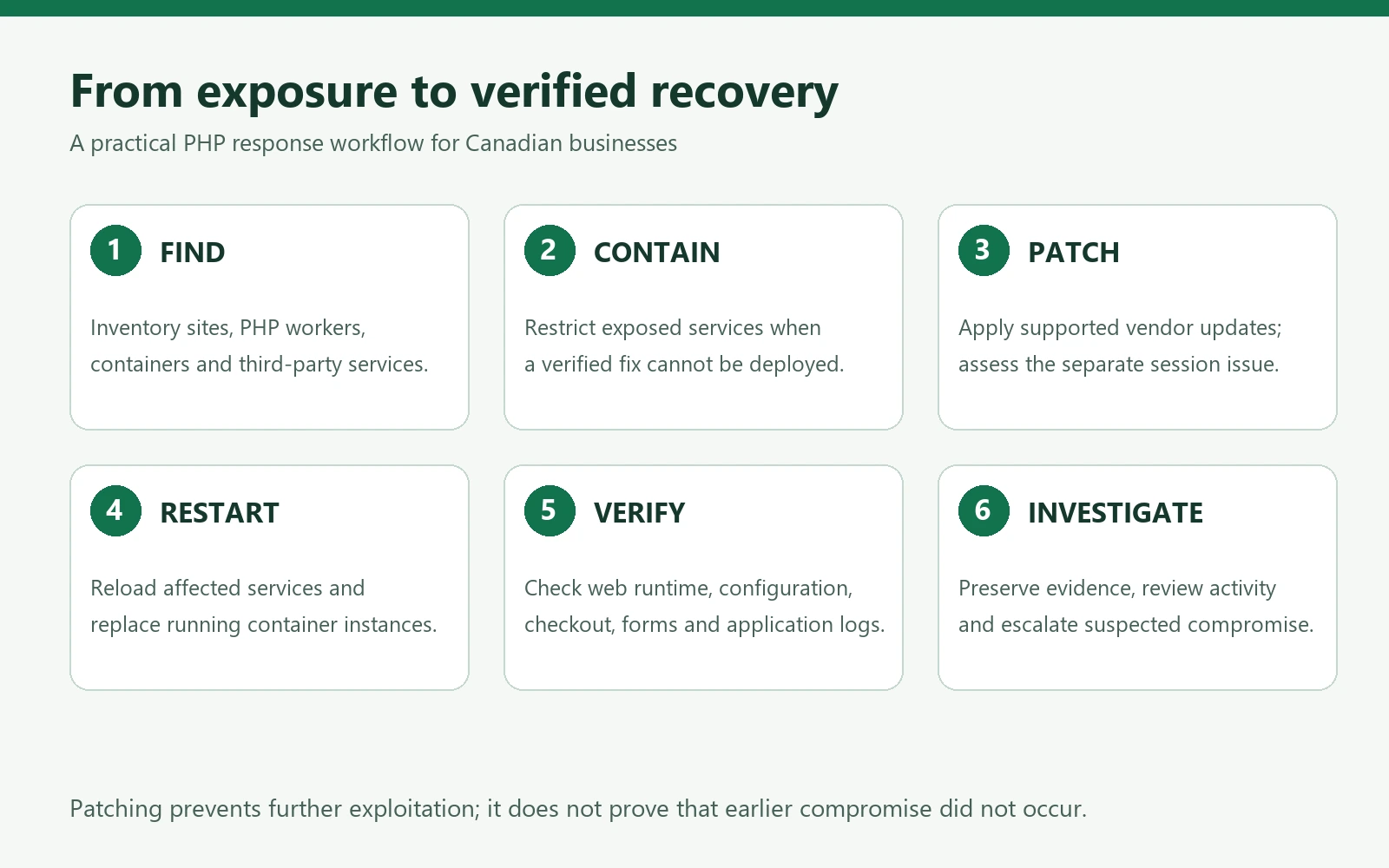
- Find every PHP installation: include public websites, staging sites, customer portals, containers and software supplied by outside vendors.
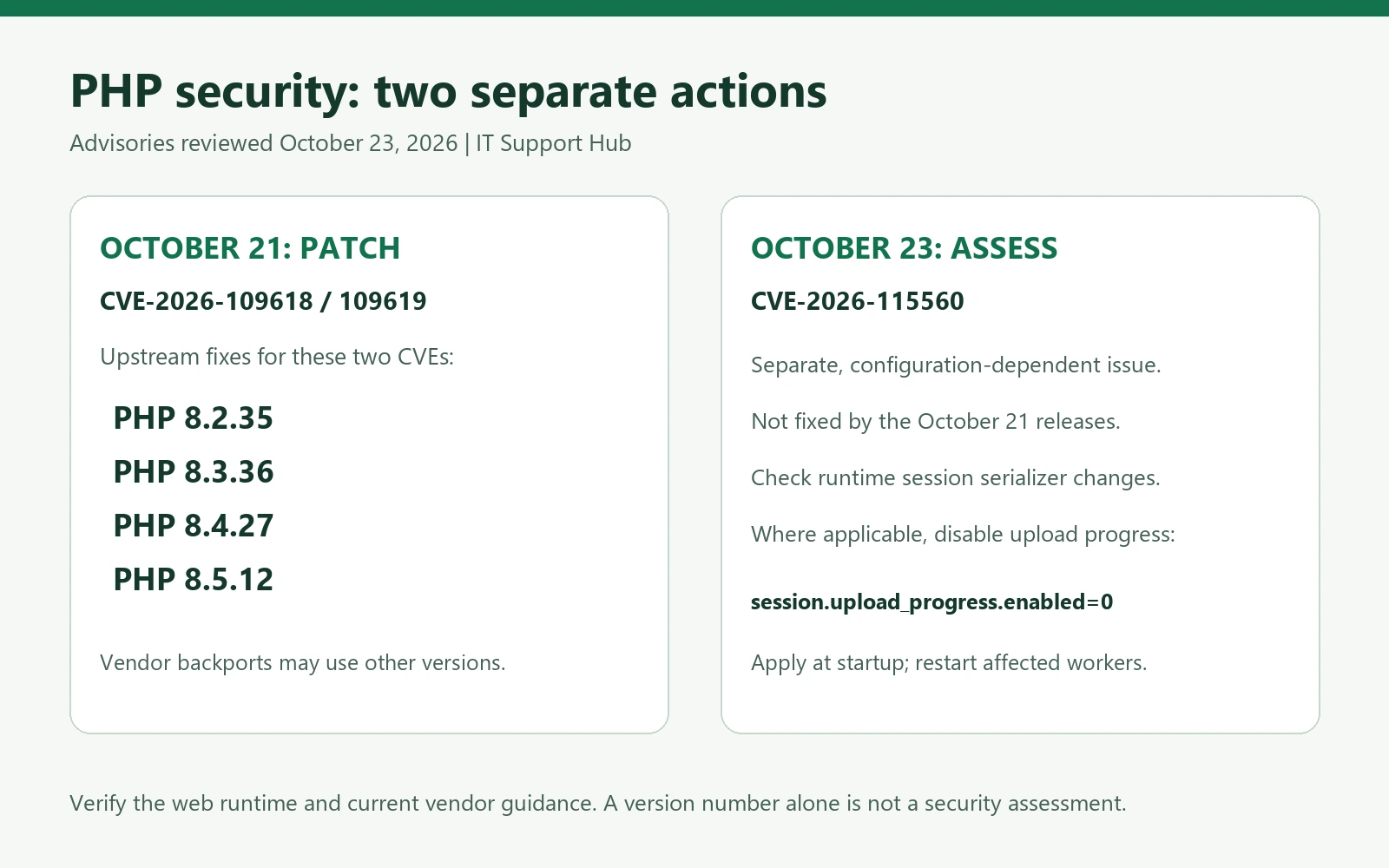
- Patch the two PHP2Shell vulnerabilities: upstream fixes were released in PHP 8.2.35, 8.3.36, 8.4.27 and 8.5.12. Supported vendor backports may carry different package versions.
- Assess the October 23 advisory separately: CVE-2026-115560 is not resolved by those October 21 releases and depends on particular session configuration behaviour.
- Restart and verify: confirm the web application is running the corrected software and configuration, rather than relying only on a successful package installation.
- Review possible exposure: patching does not remove a foothold an attacker may already have established.
The Canadian Centre for Cyber Security alert is the main Canadian technical reference. Its October 23 update adds the third issue, reinforcing why a one-time version check is insufficient.
What is PHP, and why does a PHP security flaw matter?
PHP is a programming language and server runtime used to process web requests. It can retrieve database records, handle a contact form, build a customer account page or support an online store. Visitors usually see the resulting page, not the PHP software doing the work.
A typical business website has several layers: hosting infrastructure, an operating system, a web server, PHP, a content management system and extensions. Updating one layer does not automatically update the others. A WordPress plugin update, for example, does not necessarily change the PHP version selected in the hosting account.
Remote code execution, or RCE, means an attacker may be able to make the server run instructions they control. The resulting access generally starts with the permissions of the affected PHP or web-server process. It is not automatically full administrator access, but those permissions may already allow access to application files, database credentials or customer information.
The business question is therefore broader than whether a website remains online: what can the web process read, change and reach? Separate accounts, limited permissions, network segmentation and protected backups can reduce the damage if one application is compromised.
Latest PHP security news: the October 2026 timeline
| Date | Verified development | Business implication |
|---|---|---|
| October 17, 2026 | Amazon threat intelligence later identified exploitation attempts against its MadPot honeypot infrastructure. | Incident reviews should consider activity before public disclosure. |
| October 21, 2026 | PHP published emergency security releases for CVE-2026-109618 and CVE-2026-109619. | Prioritize affected PHP services, including software bundled with other products. |
| October 21–22, 2026 | Canadian authorities and service operators described precautionary measures and some temporary disruptions. | A service outage can be a defensive action, not evidence of a successful attack. |
| October 23, 2026 | PHP and the Canadian Cyber Centre highlighted the separate CVE-2026-115560 session issue. | Check relevant application configuration even after deploying the earlier patches. |
Amazon’s investigation describes attempted exploitation before disclosure and broader attempts afterwards. It also distinguishes observed attempts from uncertainty about success against real-world targets. That distinction matters: scanning, an attempted exploit and a confirmed breach are different findings.
Which PHP vulnerabilities are involved?
CVE-2026-109618: an out-of-memory error-handling flaw
This issue concerns how PHP handles an out-of-memory condition. The official PHP security advisory for CVE-2026-109618 assigns a CVSS 4.0 score of 9.2 and describes remote code execution risk. Exploitability varies with the server integration and circumstances; the advisory includes validated Apache mod_php behaviour.
A business should not decide it is safe merely because its host uses a different deployment model. Ask the hosting provider to assess the actual runtime and apply its supported fix. Avoid copying emergency configuration changes from social posts without understanding their effect on resource limits and application availability.
CVE-2026-109619: stale state during request cleanup
The second issue involves request shutdown and stale internal state. Its official PHP advisory also gives it a CVSS 4.0 score of 9.2. Depending on the execution path, consequences can include memory disclosure or execution with the worker’s permissions.
Some configuration changes reduce particular attack paths, but they are not a universal substitute for updating. A clean-looking access log is also not conclusive evidence that a vulnerable service was never exploited.
CVE-2026-115560: a separate October 23 session issue
The PHP project’s October 23 notice describes a narrower session upload-progress problem. It applies when an application starts with session.serialize_handler set to php_binary or php_serialize, then changes it to php at runtime using ini_set() before session_start(), while session upload progress remains enabled.
Applications that never change the session serializer at runtime are not exposed to this particular vector. As of this review, the notice points to a future regular bugfix release. The October 21 releases do not fix it. For affected deployments, PHP identifies disabling session.upload_progress.enabled in startup configuration and restarting the affected workers as a mitigation. Developers should assess application behaviour before making the change.
Do not apply the 9.2 scores from the first two advisories to this third issue or describe every patched PHP site as vulnerable to it. Each advisory has its own conditions.
Which PHP versions need updating?
The following are the upstream releases containing fixes for the two October 21 vulnerabilities. They are not a blanket declaration that every security issue has been resolved.
| PHP branch | October 21 fixed upstream release | What to verify |
|---|---|---|
| 8.2 | 8.2.35 | Patch now and plan migration before this branch’s support ends. |
| 8.3 | 8.3.36 | Confirm the website uses the updated branch. |
| 8.4 | 8.4.27 | Restart affected services and test application functions. |
| 8.5 | 8.5.12 | Assess the October 23 issue separately. |
Use the version ranges and release links in the two PHP GitHub advisories above. If a newer supported security release is available when you act, follow current vendor guidance rather than deliberately stopping at these minimum versions.
Managed hosting and Linux vendors sometimes backport a security fix while retaining an older-looking base version. Ask for the package revision, security bulletin and confirmation covering both CVE numbers. Conversely, the presence of an updated PHP command-line executable does not prove that a website’s PHP-FPM pool has been updated.
cPanel’s advisory explains its distribution-specific updates and the importance of checking deployed PHP packages. Hosting panels may offer several PHP versions at once, with different domains assigned to different versions. Older branches also need a vendor-specific answer: do not assume a backport exists, or assume that a lower version string proves no fix was supplied.
What major websites and organizations are affected?
The evidence currently supports a list of organizations issuing advisories or taking protective action. It does not support a list claiming that all of them suffered data theft. Likewise, a platform’s use of PHP does not establish that its public website was compromised.
| Organization or platform | What the source confirms | What it does not establish |
|---|---|---|
| Government of Canada | An October 22 Treasury Board statement described temporary disruptions to some websites and online services during mitigation. | The statement said there was no indication of compromised government systems or data at that time. It does not identify every affected website. |
| University of Toronto | Its security team published a PHP2Shell advisory for administrators. | An advisory is not an announcement that the university was breached. |
| School District 42, British Columbia | The district reported completing protective security updates for its WordPress school and district websites on October 21. | The notice does not report a confirmed attack or stolen information. |
| ReadSpeaker | The company described isolating systems that could not immediately be updated and completing its remediation on October 22. | That statement predates the separate October 23 advisory and should not be treated as confirmation about the later issue. |
| WordPress, Drupal and Joomla deployments | Researchers demonstrated exploit scenarios involving these applications in controlled environments. | A demonstration does not show that WordPress.org, Drupal.org, Joomla.org or every customer site was breached. |
Sources: Treasury Board’s October 22 statement; University of Toronto security advisory; School District 42 update; ReadSpeaker security notice; and the researchers’ PHP2Shell disclosure.
The practical lesson for a Canadian business is to verify its own environment and suppliers. A recognizable brand name is neither proof of compromise nor a guarantee that a hosted service is unaffected.
How could a PHP vulnerability affect a Canadian business?
Lost sales, appointments and enquiries
A retailer may need to pause checkout while its host patches the server. A professional-services firm may lose enquiries if contact forms stop working. A clinic or contractor may need a temporary alternative to online booking. These are possible operational effects, not confirmed outcomes for every vulnerable site.
Prepare a simple continuity message, a tested alternative contact route and an owner who can decide when a service should be restricted. Do not redirect customers to an improvised form that collects sensitive information without appropriate controls.
Access to customer information and application secrets
A compromised application account might expose information available to that account, such as database connection details or files uploaded by customers. The scope depends on permissions, storage design and segmentation. A website vulnerability does not automatically mean every system in the business has been accessed.
Review whether the website shares credentials, storage or administrative access with other services. Keeping a public-facing application separate from internal file services can make incident containment more manageable.
Website integrity, search visibility and reputation
An attacker who can change website content may insert spam pages, malicious redirects or deceptive payment instructions. That can damage customer trust and create search-engine cleanup work. Businesses should monitor unexpected administrator accounts, unfamiliar files, changed checkout destinations and unusual outbound traffic alongside uptime.
Third-party exposure
Your main website may be patched while a supplier’s booking widget, legacy customer portal or reporting application remains under assessment. Keep a supplier register that identifies who runs the software and who can provide a security update. A general statement that “the server is current” is less useful than a response tied to the CVEs, service and deployment date.
How to fix PHP vulnerability exposure: a practical response plan
1. Build a complete inventory
List each domain, hosting account, responsible person, PHP branch and update source. Include staging environments, abandoned subdomains, scheduled jobs, appliances, development systems reachable from the internet and container images. Record which business process depends on each service.
For a small company, a spreadsheet can be enough. Useful columns are service name, owner, provider, public exposure, PHP runtime, relevant CVEs, planned action, deployment time and verification evidence. The inventory should produce an accountable action list rather than a collection of unexplained version screenshots.
2. Contain services that cannot be fixed promptly
Use a risk-based maintenance decision with the application owner. Options may include restricting access to trusted networks or temporarily taking the affected service offline. A maintenance page should not depend on the vulnerable PHP path it is supposed to replace.
The Canadian Cyber Centre’s public statement recommends identifying exposed systems and isolating them where patching is not immediately possible. A web application firewall can provide additional filtering, but it does not correct the underlying runtime. Our network and firewall support page explains the broader role of network controls.
3. Preserve evidence and confirm recovery options
Retain relevant access, error, authentication and deployment logs before routine rotation removes them. Record the time of your changes. If compromise is suspected, involve incident-response support before wiping systems or overwriting files that may be evidence.
Check that backups are accessible, protected and restorable. A backup taken after an attacker changed the website may contain the same changes. Recovery planning therefore needs both a known-good restore point and a process to bring the restored system up to date before exposing it again. See backup and disaster recovery support.
4. Apply supported PHP updates
Use the operating-system, hosting-panel or application vendor’s supported update channel. Test critical functions in staging when feasible, but keep the validation window proportionate to the risk of leaving an exposed service unpatched. Check application compatibility before jumping to a different PHP major or minor branch.
For containers, updating a package on the host does not necessarily change PHP inside the image. Rebuild from corrected dependencies and replace running instances. For shared hosting, request confirmation for the specific domain and its assigned PHP handler. For a vendor appliance, use the supplier’s update instructions rather than manually replacing bundled components.
5. Assess the separate session configuration issue
Have the developer review session initialization against the October 23 notice. The relevant question is whether the application changes serializer behaviour at runtime in the affected sequence, not simply whether it uses sessions.
Where applicable, apply the documented startup mitigation, restart workers and test features that depend on upload progress. Record the temporary measure and assign an owner to replace or revisit it when a vendor fix becomes available. Do not use a single configuration toggle as proof that the other two vulnerabilities are fixed.
6. Restart and verify the actual web runtime
Reload or restart the affected services using the provider’s instructions. Confirm that old worker processes have been replaced. Check the runtime serving the relevant website through an authenticated hosting interface or a controlled diagnostic method. Do not leave a publicly accessible PHP information page behind.
Test login, logout, contact forms, file uploads, checkout, payment-provider callbacks, scheduled tasks and any business-critical integrations. Watch error logs for compatibility problems. Save evidence showing the service, package revision, applicable configuration, time and person who verified the change.
7. Investigate earlier exposure and escalate findings
Review unusual requests, unexpected file changes, new accounts, altered scheduled tasks and unfamiliar outbound connections. Include the pre-disclosure period identified by threat-intelligence reporting. Correlate application logs with hosting, identity and network records where available.
If an attacker may have accessed secrets, plan credential rotation after containment and coordinate it across dependent applications. Simply changing a database password while leaving an attacker-controlled process running can expose the replacement password too. Escalate suspected compromise to qualified responders and preserve a clear record of actions.
Does a Canadian business have to report a PHP incident?
A vulnerability is not automatically a reportable privacy breach. Under PIPEDA, organizations subject to the law must assess breaches of security safeguards involving personal information under their control. Where there is a real risk of significant harm, reporting to the Office of the Privacy Commissioner of Canada and notifying affected individuals are required as soon as feasible.
The OPC also requires records of all breaches of security safeguards, generally retained for at least two years. Provincial, sector-specific and contractual duties may also apply. Consult your privacy lead or legal adviser for an actual incident. The OPC’s breach-response guidance explains the assessment, reporting and recordkeeping requirements.
Questions to send your hosting company or software supplier
- Which PHP version and package revision serve our specific domain or application?
- Have you deployed fixes covering CVE-2026-109618 and CVE-2026-109619?
- Have you assessed CVE-2026-115560 against our application’s configuration?
- Does the work cover every relevant PHP pool, container and secondary environment?
- Were affected workers restarted, and when was the web runtime verified?
- What logs and investigation findings are available for the exposure period?
- Are any temporary restrictions still required, and who owns the next update?
Keep the response with your change record. If a provider uses a backported fix, request its security bulletin rather than insisting that every system display the upstream version number.
How IT Support Hub can assist Canadian businesses
A useful support engagement starts with a defined scope: which services you own, which providers control them and whether the priority is preventive patching, service restoration or investigation of suspected compromise. Contact IT Support Hub to discuss the work required for your environment.
- Cybersecurity support can be the starting point for discussing exposure, priorities and appropriate protective controls.
- Server support can help scope operating-system and application maintenance, including coordination with a web host or developer.
- Co-managed IT provides a way to discuss additional support alongside an existing internal team.
- IT consulting can help turn emergency work into a documented upgrade and lifecycle plan.
- Small business IT support offers a route for organizations that need help identifying who owns the technical response.
For Toronto and GTA organizations, visit our Toronto IT support page. If a business-critical service is unavailable, use our emergency IT support page or contact IT Support Hub to explain the affected service and urgency. The required work, access and response arrangements should be agreed for the specific situation.
Longer term, assign patch owners, track supported software versions, test recovery and review supplier responsibilities. Our comparison of break-fix and managed IT support explains the operational difference between reacting to individual problems and maintaining an ongoing support arrangement.
Frequently asked questions about PHP vulnerabilities
Does updating WordPress fix PHP2Shell?
Not by itself. WordPress and PHP are separate software layers. Keep the application and extensions current, but ask the host to verify the PHP runtime and relevant security fixes.
Is my website safe if it uses HTTPS?
HTTPS protects information in transit between a browser and the website. It does not repair a server-side PHP flaw. You need both encrypted connections and maintained server software.
Can a firewall replace the PHP update?
No. Filtering can support containment, but coverage depends on the attack path and configuration. Deploy the relevant software fix and treat temporary filtering as an additional control.
Does a PHP warning mean customer information was stolen?
No. Establish whether the application was exposed, whether an attack succeeded and what information was accessible. Do not equate vulnerability, defensive downtime and confirmed data theft.
What if our website is hosted by another company?
Ask for a written, service-specific response to the supplier checklist above. Clarify whether the host, developer or your business owns application testing and the separate session configuration assessment.
Can we simply restore yesterday’s backup?
A restore may recover files, but it can also reintroduce vulnerable software or malicious changes. Validate the restore point, update the rebuilt environment and investigate the original incident before reopening access.
How can we reduce the next emergency?
Keep an inventory, remove unused sites, track software support dates and make patching a recurring responsibility. Pair those practices with restricted permissions, tested backups and a clear escalation plan.
Next step: get a verified answer for your own website
Ask the person responsible for your hosting to confirm the running PHP package, the two October 21 fixes, the separate October 23 assessment and the result of post-update testing. If nobody can give you that answer, start with an inventory and assign an owner today.
Contact IT Support Hub to discuss a PHP security review and response plan for your business.
Editorial note: Technical details were checked against the primary sources linked throughout this article on October 23, 2026. Organization examples describe the statements available at that time, not independent forensic findings. Illustrations are explanatory graphics, not images of a real incident.